7-steps to land a remote job in 3-weeks
An uncommon guide to becoming a digital nomad
NOTE: I’ve previously shared this on Reddit, but thought I’d post it for the great minds here as well. Below is a copy from my original 2022 posting which garnered 88,000 views in 48-hours. Since then, dozen’s of people have followed the system to land their own remote jobs. Most of the recommended apps still apply, but all the principles remain exactly the same. Enjoy :)
Hey Y’all!
Discovered this subreddit last month and have been loving it! I’ve been a remote worker for 4-years now and never imagined the community being so large. Feel like I found a secret tribe! I figured I better contribute something to the remote work community as I’ve been stealing ideas and inspiration from everyone else. So, I created a little guide about the process I use to get remote work jobs in just 3 weeks as I know there are some people on here who are probably dreaming about becoming a remote worker (as I once was) and are not sure how to get started. The usual “start your own business” advice can seem daunting and out of many comfort zones, as it was mine, so this will focus on the process of getting employee remote work positions. If you already are a remote worker then this post won’t be for you- but for those looking to get “in the game” then I’m positive you’ll be able to pick up something of value to use on your journey!
However, I hope you find something of value in this write-up regardless of what level you are at. I figure if you’re on the Digital Nomad subreddit then you already have a degree of knowledge on the subject. The list below should help you get started if you’ve been lurking or help you shift professions if you’re looking for a career pivot. Either way enjoy and feel free to message me on Instagram if you have any questions at corybeardsley_ . I’d be happy to help! I know how difficult this process was when I first started and how much I could’ve used someone so don’t hesitate to slide into my dm’s lol. I’m only signed into reddit on my computer so I don’t typically see messages for a bit but I’ll try to stick around for the day and answer any questions in the chat. Cheers!
Also, there are many ways to get a remote work job. This is just one of them. It’s not the fastest, best, or easiest. It’s just the way I’ve learned to go about it over the last two years and I’ve tried to condense it enough to fit on one page but sadly got a little carried away lol.
COVER LETTERS
Annoying? Yes. Useless? Maybe. Required on most job applications? Unfortunately. We have just 6 seconds to make an impression on the cover letter so you need to stand out quickly. The first template I use is the idea based cover-letter from Robert Gibbs: “Hi [NAME OF HIRING MANAGER] — I love what you’re doing at [COMPANY]. Before telling you about my skills and experience, I’d like to lead with a few ideas for ways to help [COMPANY] as the [JOB TITLE]. These are not refined ideas, but should help get the conversation started about how we can work together. {First idea}. {Second idea}. You can learn more about my accomplishments on my resume [create hyperlink to site], but in short: [A BRIEF DESCRIPTION OF YOUR BACKGROUND]. I’d love to chat about my ideas above and the [JOB TITLE] position — does any time this week work for you? [YOUR NAME].”
The most important thing: Don’t recycle ideas. Make your suggestions specific to the company you’re applying to. My next template is a simple short & sweet method. Although some sites still ask you to attach a cover letter file, most will just have a section for you to type out your cover letter manually or state why you’re a good fit. You can do so yourself, or copy this basic cover letter message if you’re in a time crunch:“Dear [Hiring Manager’s Name], As a [Position Name] with [X] years of experience [Action], I believe that I am the ideal candidate for [Company Name]. I look forward to hearing from you. I can be reached at [Your Email] or [Your Phone Number].”
Lastly, for start-ups I use the free-work cv: “Hey! Love what’s being done at [Company]. [1 line to show you’ve at least Googled the company]. Although I do have [job title or similar past role] experience, I understand that you get a lot of applicants and I don’t have years of experience, but I am so confident that this is a great fit that I am willing to do a one week trial period to show that I can handle the responsibilities of the role. If after a week you decide it’s not a great fit, I’d understand. Nothing to lose and either way you get a free week of work. If you’re interested you can reach out to [Email] for a quick reply!”.
No one has ever taken me up on the offer of a free trial. It’s just used to stand out quickly and get my foot in the door for a first round interview. Once I started using this cover letter template my interview requests jumped nearly 300% in a week (4 to 12).
2. WEBSITE
A key mental shift to adopt is that we are not trying to get a remote work job, we are trying to get interviews for a remote work job. A subtle but important perspective shift. The most underutilized way to do so? Portfolio Sites. You can create one for free by going to WordPress.com
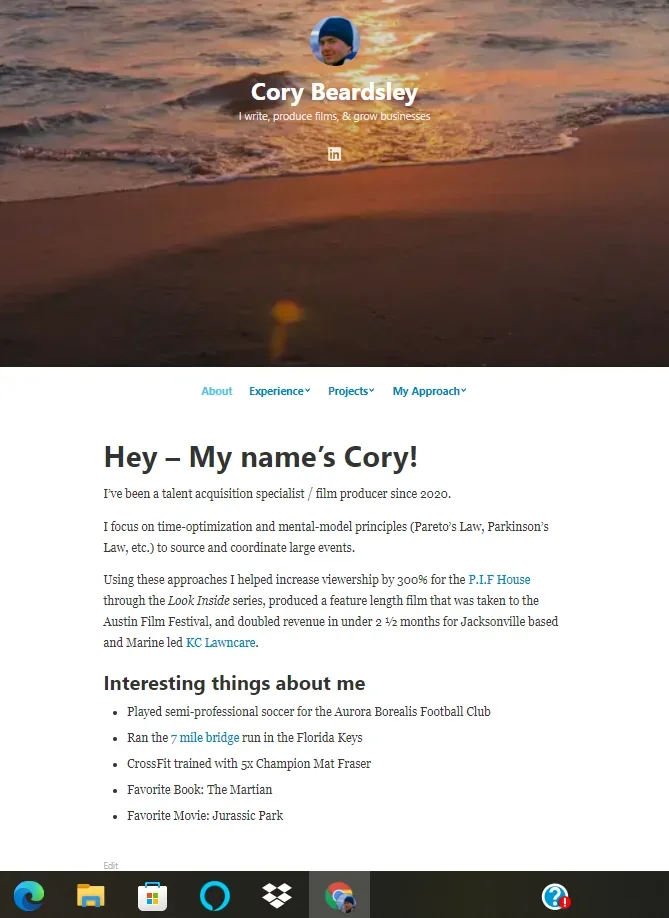
My site template is an opening About Me page which is very relaxed. I then include a Projects section, an Experience section, and a My Approach section. The Projects section includes two projects I worked on, whether personal or career based. Experience is a further elaboration on the 2-3 jobs listed on my resume including testimonials (more below) and the My Approach page is a video where I talk about time-management principles like Pareto & Parkinson’s law for two minutes. This is so the hiring manager can see me “live” and helps speed up the dating process. In the onboarding process for WordPress I always select build (NOT store or write) and use my first & last name for site title & address. For themes I use Independent Publisher 2 and include a stock sunset pic for my header image alongside a gravatar (free with WordPress) which is the same image used across platforms (LinkedIn/Resume). If you don’t know how to build a website there are plenty of great videos detailing the process on YouTube, like this one. However, if you’re tech savvy enough (which you probably are if you’re on this subreddit) you can create one solo!
3. RESUME (Visual CV)
I always create a resume through VisualCV that I have linked out to the various pages on my portfolio site. VisualCV has a multitude of templates and also allows you to track data to see how many people viewed your resume and which links they clicked. They used to offer one free resume, but if that’s no longer the case it costs $18 for unlimited resumes. I use a standard experience/education combo for the thick of it, but also throw in a headshot and a sidebar that links out directly to the project pages on my portfolio site. You can create a linkable resume for free through Google Docs as well, although more difficult. The key is to have direct links to your portfolio site.
4. APPLICATIONS (FlexJobs)
LinkedIn. Indeed. Ziprecruiter. All great sites for exploring the remote job market and are used by millions of people worldwide. LinkedIn even has a feature now that allows you to search exclusively for remote work positions! How great! F*** that noise. There’s only one site you need and it’s FlexJobs I’m astonished this isn’t listed on every remote work guide. I have a borderline unnatural love for this app. What it does is scans through and verifies remote work jobs across the globe and uploads them to their site. From there you can create a search criteria that helps you find jobs aligned within your industry and preference. They have a bunch of bonus features too and will send a gift package once you get your job. In my experience, the majority of jobs that meet my criteria on the initially listed trio of career sites have been pyramid schemes, insurance hustles, or straight scams. FlexJobs saves you from having to validate each listing and prevents you from sending out useless applications. Full disclosure it does cost money ($10week/$15mth/$60yr) but it’s like having a VA for your job hunt and is well worth the cost.
AUTHOR NOTE: LinkedIn Premium works, but not LinkedIn itself. Hiring managers often filter by premium to whittle down application pool, as I have seen first hand.
5. INTERVIEWS
I always create a resume-review monologue that I place in a Google Doc that I reuse for all my interviews. I split the screen between the document (about 1 page) and video chat when the interview starts. Having the interviewer appear smaller on my screen oddly calms me down and having the monologue ready helps save time in the preparation process. I adjust it slightly for each position to include key industry jargon and words directly used in the job posting but nothing more than a sentence or two. I also come prepared with a canned question to ask at the end which is a version of: “You’ve actually done a great job explaining the role and answered all my questions here. I guess the only one I’m left with is whether it be me, or someone else, what would you like to see in the next 3-6 months to know you’ve made the right hire for the role”. If it’s only the first round interview I typically pocket the question and transition to a version of “I’ve had a great time discussing the role and look forward to next steps” closer. Other than that I just spend an hour the night before reviewing the company's social media accounts to prepare.
6. LINKEDIN
You can learn to set one up here. I recommend having 500 connections. Once you get over 500 it stops tallying and appears simply as a 500+ which is further social proof to validate your online presence. Social proof and online validation is key when applying for a remote position and submitting your LinkedIn profile is often required for many job applications. To build up your network simply fill out your profile and go to the my network tab on the site. From there just click connect on all recommendations. 99% will not message you but if you want to reach out to specific people by all means go for it! Another way to leverage LinkedIn is to visit the profile page of companies you may be interested in working for and going to the peoples section. You can look for recruiters, talent acquisition, or hiring managers and connect with them. You can then message to set up a “time to talk” about a specific role, not a vague “position”. To find a specific role you can go to the company's LinkedIn profile under jobs. Also, you may encounter an individual you are interested in connecting with that does not have a connect option under their profile. To bypass this go to their page and select more. A new pop up will appear and you can select connect from there.
7. Testimonials
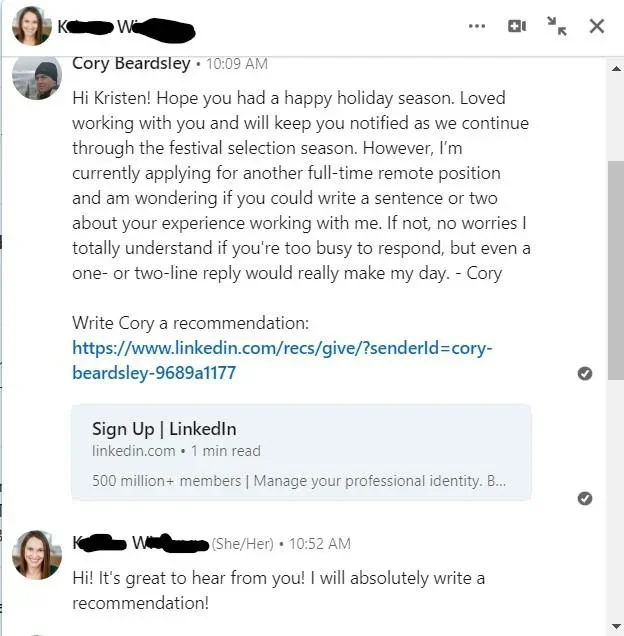
Getting testimonials on your website or LinkedIn is one of the best forms of content to have in your remote-work job hunt. You can add in testimonials to the relevant experience sections of your portfolio site and include them on your LinkedIn profile as well. To request a testimonial from an individual on LinkedIn go to their profile, select more, and click request recommendation. The template I use to ask for testimonial requests is: Hi {first name}! Loved working with you and hope you're still enjoying your time at {company}. I’m reaching out because I’m applying for a full-time remote work position and am wondering if you could write a sentence or two about your experience working with me. If not, no worries, I totally understand if you’re too busy but even a one- or two- line reply would really make my day. Best- Cory. Testimonials from LinkedIn can be copied into your portfolio site as well.
Hope you found something of value in there! If you did it is less so due to any perceived intelligence that I may possess and more to do with the months of rejection I endured early on. It sucked- and I hope that this guide speeds up your process so you don’t have to endure the same. Feel free to adjust every template to better fit your voice and if you have any questions feel free to message me on Instagram. Wish y’all the best!
Cheers - Cory.
